SkillShark Athlete Ranking & Reporting: Which Report Should You Use?
SkillShark gives you the full picture after a tryout, from raw and averaged scores to custom-weighted and position-specific rankings, plus automatic team drafting. This guide explains the four main reports (Score Overview, All Scores, Weighted Reports and Tiered Draft Reports) and when to use each one.
Which SkillShark Report Should You Use?
Report | What It Shows | Best For |
|---|---|---|
Score Overview | Raw and averaged scores, evaluator comments, videos, and the Score Audit tool for flagging unusual or missing scores. | Reviewing individual scores, catching potential errors, and verifying evaluation results. |
All Scores | A ranking of all athletes from top to bottom, overall and by evaluation category, skill, and metric. | Comparing overall athlete performance and identifying top performers in specific skills. |
Weighted Reports | Athlete rankings using custom weights you assign to skills and metrics after the evaluation. | Creating customized rankings based on your team selection criteria. |
Tiered Draft Reports | Advanced rankings with custom weights for skills, metrics, and sessions, plus automatic team drafting. | Managing multi-day tryouts, creating position-specific rankings, and auto-drafting balanced or ranked teams. |
A few terms you'll see below
Skills and metrics: A skill is a broad evaluation area, like serving. Metrics are the specific things evaluators score within a skill, like serve accuracy or velocity.
Normalization: Makes sure rankings aren't skewed by overly harsh or generous evaluators. Original scores never change.
Weighting: Deciding how much each skill, metric, and session counts towards rankings. Can be used to calculate position-specific rankings.
All Scores, Weighted Reports, and Tiered Draft Reports use normalization. Score Overview shows the raw evaluator scores.
Learn why normalization matters for fair athlete rankings.
Score Overview: Review Scores and Catch Mistakes
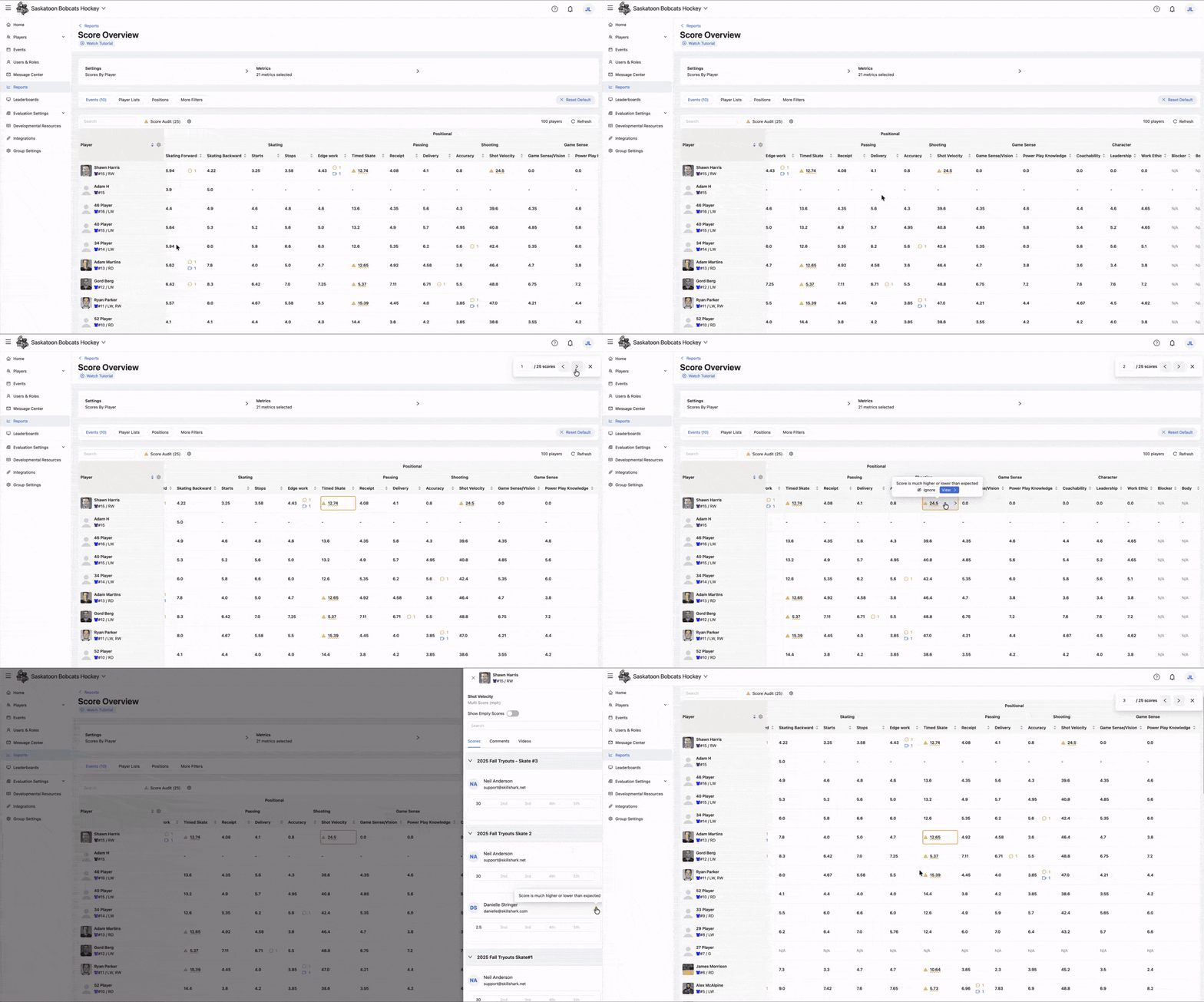
SkillShark's Score Overview report shows raw and averaged athlete scores, filtered by the metrics, evaluation events, player lists, and other options you choose.
For example, if three evaluators score an athlete 6, 7 and 8 out of 10, Score Overview shows the average of 7. Click the score to see each evaluator's individual score, plus their comments and any videos.
The Score Audit tool flags unusually high, low, or missing scores, so administrators can review potential errors before selecting teams.
Learn More About Score Overview
Available on all paid SkillShark plans.
All Scores: Compare Athlete Rankings
The All Scores report ranks all your athletes from top to bottom. Start with the overall ranking, then dial into specific skills and metrics to see who's strongest in each.
For example, a volleyball club can review its top-ranked athletes overall, then compare players on serving, and then on jump serves.
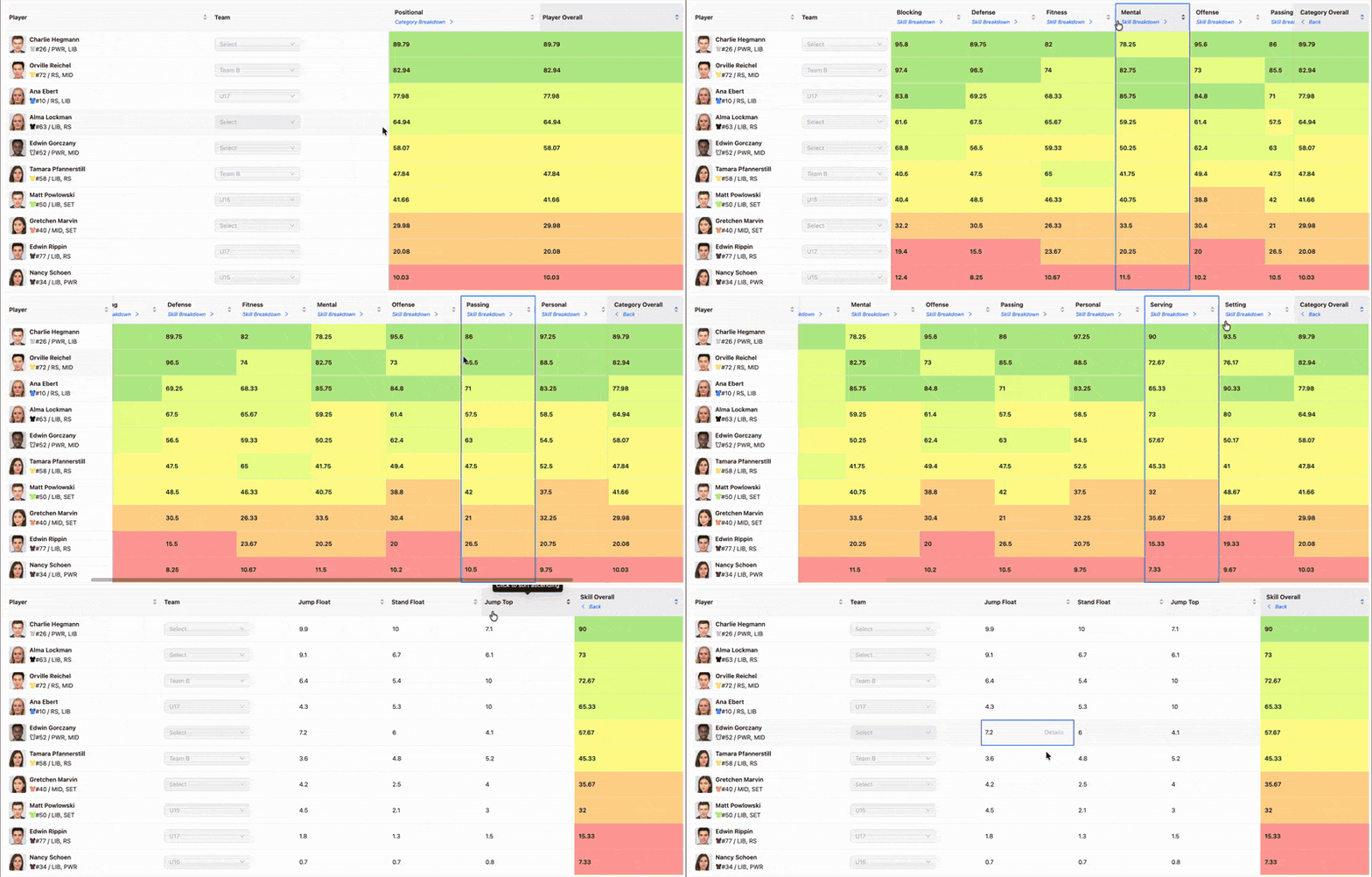
If you don't need custom weights or position-specific rankings, you can assign athletes to teams straight from this report using the Team dropdown next to each athlete.
Best for: Comparing athlete performance overall, finding top performers in specific skills or metrics, and picking teams when you don't need custom weights or position-specific rankings.
Available on all paid SkillShark plans.
Weighted Reports: Rank Athletes Using Your Own Criteria
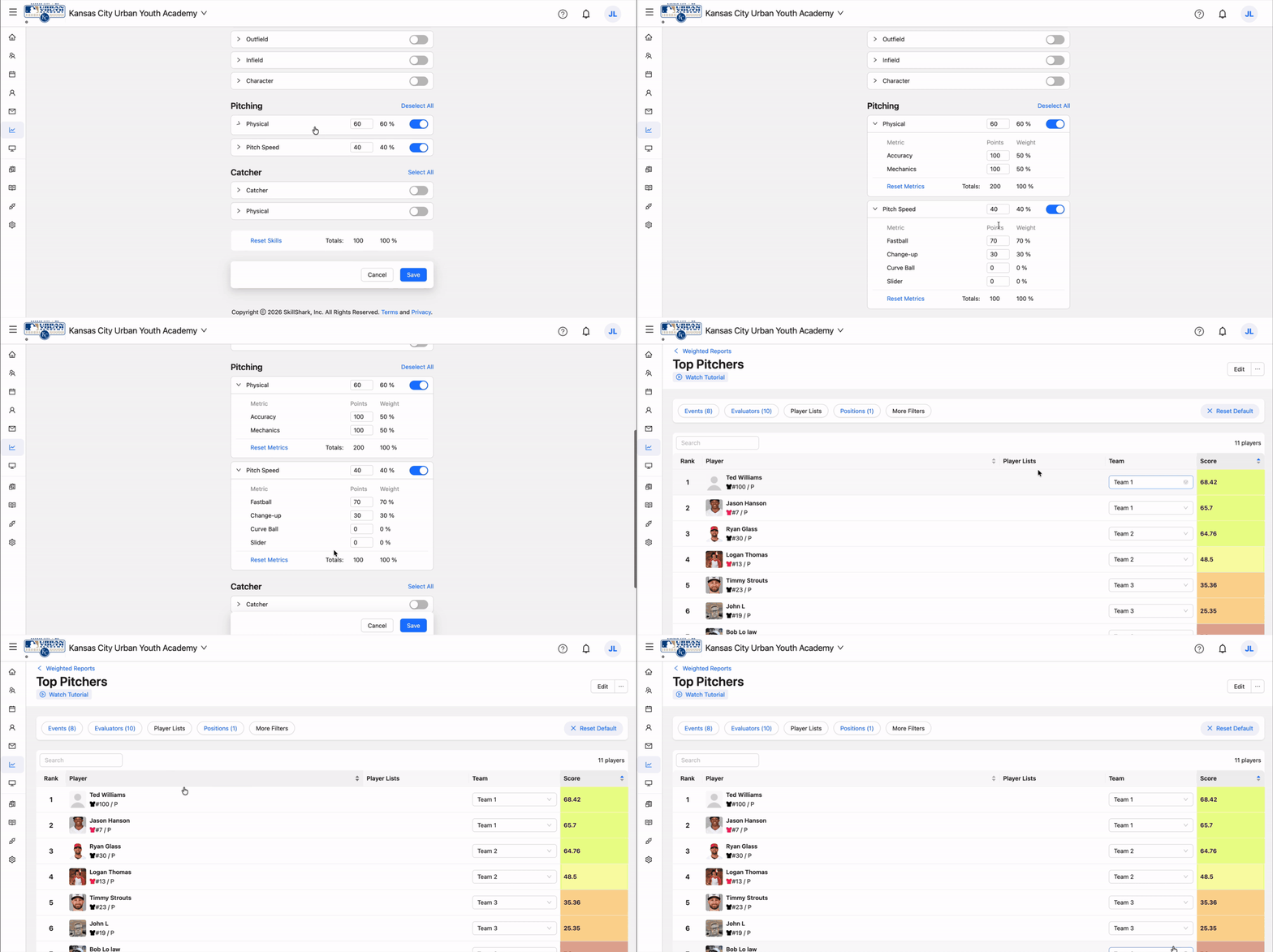
Weighted Reports let you choose how much each skill and metric counts toward player rankings. You can also build position-specific rankings, like one for pitchers and one for catchers. Change the weights at any time and the rankings update automatically.
For example, a baseball organization ranking pitchers might assign the following criteria:
Physical: 60%
Accuracy: 50%
Mechanics: 50%
Pitch Speed: 40%
Fastball: 70%
Change-up: 30%
Best for: Creating custom and position-specific rankings based on your organization's team selection criteria.
Learn More About Weighted Reports
Available on all paid SkillShark plans.
Tiered Draft Reports: Advanced Rankings and Team Selection
Tiered Draft Reports are SkillShark's most customizable ranking and team formation tool. Use them for multi-day tryouts, for positions that need to be judged on different skills, or to draft ranked or balanced teams automatically with a set number of players from each position on every team.
What you can do with Tiered Draft Reports:
Weight sessions from multi-day tryouts. Every SkillShark report can combine rankings from multi-day tryouts, but Tiered Draft Reports let you decide how much each session is weighted. For example, count scrimmages more than a skills session.
Rank each position on its own criteria. Judge goalies on goalie skills, defense on defensive skills, and forwards on forward skills, all in one report.
Auto-build balanced scrimmage groups. Spread athletes evenly between sessions so everyone faces fair competition in the next round.
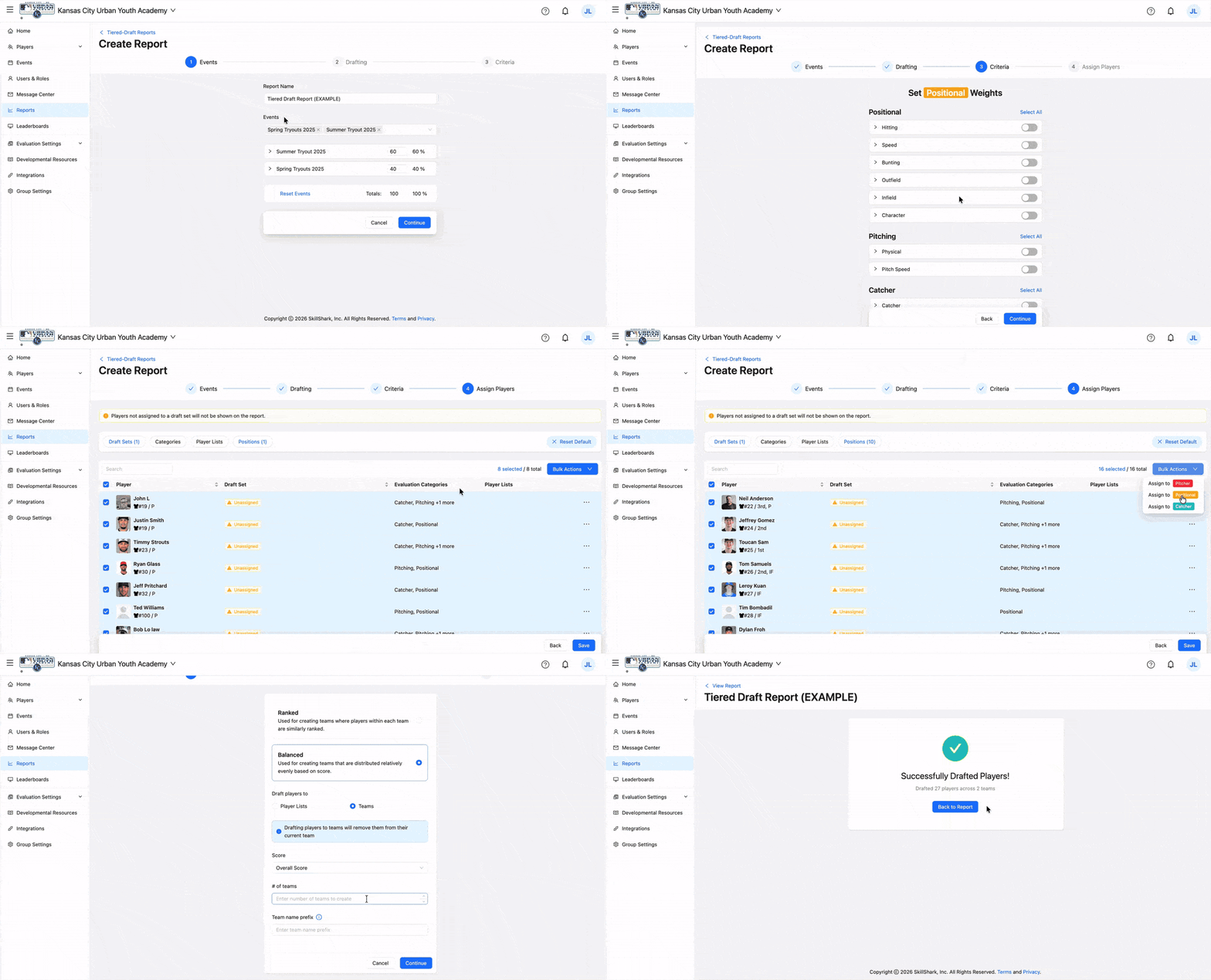
Auto-draft ranked or balanced teams. Draft teams by skill level, like AAA, AA and A or Tier 1, 2 and 3, or build balanced teams with talent spread evenly. Either way, every team gets the right mix of players for each position.
How it works: Choose your evaluation sessions and how much each counts, then either pick a simple draft (everyone ranked on the same criteria) or an advanced draft (different criteria for each position). SkillShark ranks your athletes based on your criteria, then you can select athletes in bulk and assign them to teams or scrimmage groups automatically.
After teams are drafted, coaches can still manually adjust teams if needed to account for coaches' picks or to keep siblings together.
Learn More About Tiered Draft Reports
Available on SkillShark's All-Star and Legend plans.
Frequently Asked Questions About SkillShark Rankings
How do you rank athletes fairly after tryouts?
Have more than one evaluator score each athlete, score everyone on the same skills, and account for evaluators who score tougher or easier than others. SkillShark does this automatically in All Scores, Weighted Reports, and Tiered Draft Reports, and lets you weight how much each skill counts toward rankings.
How do you account for harsh or generous evaluators in tryouts?
SkillShark uses normalization, which ensures rankings aren't skewed by overly harsh or generous evaluators. With simple averaging, a 7 from a tough evaluator counts the same as a 7 from an easy evaluator, even though the tough evaluator's 7 represents a stronger score. SkillShark adjusts for that. Each evaluator's original scores never change.
Does SkillShark normalize every report, and does it change the original scores?
No. SkillShark never changes your original scores, and you can easily view each evaluator's raw scores. Score Overview shows scores exactly as evaluators entered them, along with the average, while All Scores, Weighted Reports, and Tiered Draft Reports show normalized rankings.
How do you create custom or position-specific tryout rankings?
Use Weighted Reports to choose how much each skill and metric counts, and build a separate ranking for each position, like one for pitchers and one for catchers. Tiered Draft Reports go further: you can rank each position on its own criteria within one report and decide how much each tryout session counts. You can change the weights at any time and the rankings update automatically.
Can SkillShark draft teams automatically?
Yes. Tiered Draft Reports can draft ranked teams (like AAA, AA and A) or balanced teams, with the right mix of positions on every team. They can also build balanced scrimmage groups between sessions. For simpler needs, you can assign athletes to teams from All Scores or Weighted Reports using the team selection dropdown. Coaches can always adjust teams afterward for coaches' picks or to keep siblings together.