How to Improve Basketball Tryouts With Evaluation Software

The time of year is around the corner: basketball tryouts. For some coaches, this might be a seamless process, while for others, it poses more headaches & stress than anything.
Tryouts = collecting evaluation papers, inputting scores, and formatting reports: all time-consuming tasks that can lead to flawed drafting decisions and inadequate athlete feedback. After all, does sifting through dozens of evaluation papers really provide you with the insights needed to provide meaningful feedback to athletes?
Rather, leverage an all-in-one app to score your players, create & share customized evaluation templates, make accurate drafting decisions, and provide insightful athlete feedback.
Improving Basketball Tryouts with Software
Reason #1: Easily Score Players
Toss away those archaic pen-and-paper evaluation sheets, and use your mobile device or tablet to conduct athlete evaluations instead.
Like most basketball tryouts, you will have numerous drill stations that each measure a skill(s). For instance, one evaluator might be positioned at a station where he/she is only scoring players on dribbling. Here is where the simplicity of SkillShark comes in:
Select players. *Choose all players or select from a player list (I.e., U10, U12, U14 boys).
Select the skill(s) you will be evaluating.
Quickly score players using the slider button. *Comments and video can be added as well.
Navigate to the next athlete for scoring. *Players can be sorted by jersey number, first name, or last name in advance for easy navigation.


Scoring players on basketball evaluation software
It honestly couldn’t have been easier to use SkillShark; it took us under ten minutes to get over 1200 kids set up in the program. We really couldn’t be happier with the team at SkillShark and the service they provided.
Riley Burns. Executive Director — Regina Community Basketball Association
Reason #2: Customize Evaluation Criteria
Gone are the days of printing off dozens of evaluation sheets to hand to each of your evaluators, only to have to hand-collect them once tryouts are over to enter into spreadsheets. Not to mention, this process can lead to evaluation sheets getting lost and inaccurate results being produced.
With SkillShark's basketball evaluation software, you can quickly customize a basketball evaluation template to share with all of your evaluators. Each evaluator will simply open the evaluation template on their mobile device and score players at their assigned skill station.

SkillShark's customizable evaluation template
Reason #3: Make Confident Decisions
You might be asking yourself, “How will an evaluation app help me make more accurate or quicker team placement decisions?” Let’s tackle this question from both perspectives:
Accurate decision making
The elimination of pen-and-paper forms means that the data transfer process is automatically done for you. Once scores are entered in the app, they are stored on the backend. At any point after an evaluation, you can simply choose which report you want to run to view player data.
For instance, let’s suppose after two days of basketball tryouts, you want to get an overview of player performance. In this case, SkillShark’s all-scores report is the answer, providing you with an in-depth look at how each of your players scored across all skills evaluated. Hone in to see how your players rank across specific skills like dribbling or rebounding, or zoom out for a broader view to see how your players rank overall.

All Scores Report
Quick decision-making
Enter scores. View results. Make decisions. It really is just as simple & quick as that. No more transferring scores one by one from each evaluation sheet into a master Excel spreadsheet. And no more headaches over formatting those raw scores into readable reports (that may or may not give you the insights you want).
Reason #4: Provide Player Feedback
With traditional evaluations, the tasks of manually entering data and formatting reports are already time-consuming enough. Now, factor in trying to provide quick & accurate player feedback to athletes & their parents.
SkillShark has you covered when it comes to athlete report cards:
After tryouts, navigate to the ‘Reports’ section and click on ‘Individual Reports.’
Click on the athlete you would like to view.
View a customized report card for that athlete. *Complete with scores, benchmarks, comments, and videos.
Email a copy of the player report card to athletes & their parents—directly from SkillShark.
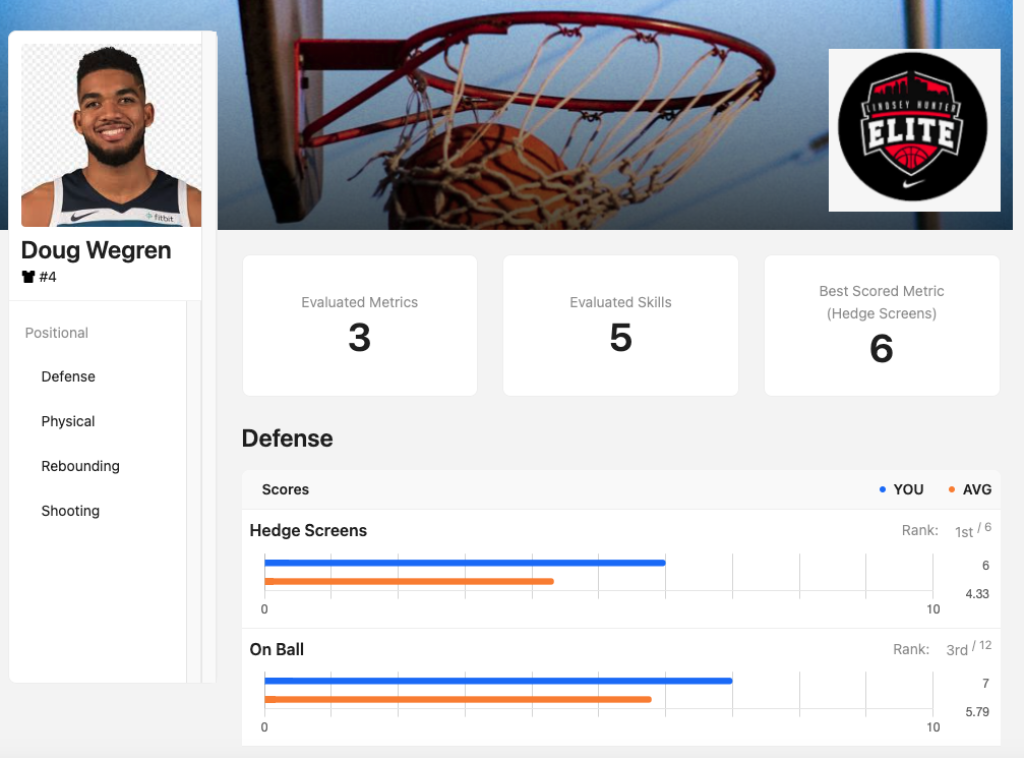

Player report cards
Wrapping Up
Toss away the pen-and-paper for a cost-effective, intuitive and, most importantly, accurate basketball evaluation software. SkillShark's all-in-one basketball coaching software streamlines tryouts and provides spot-on player insights ready at your fingertips.
Spend less time & energy on the evaluation process and more time on what truly matters: coaching your team to success.

Customer Testimonials
Explore how SkillShark has transformed careers and organizations through real-life success stories. Join our community and streamline your athlete evaluations today.

Phil Jevtovic
Senior Manager - Canada Basketball

Dari Arrington
Pro Skills Trainer

Bill Edwards
Hofstra Head Coach

Cory Trann
PA Minor Hockey — Evaluator

Farida Salem
Founder of Empower Football

Jordan Draeger
Owner & Operator — Going Yard Baseball

Danielle Stringer
Danielle is a dynamic content marketer with a unique blend of creativity and analytical expertise. She is driven by her passion for helping companies scale through lead generation, always finding distinctive ways to connect with her audience. Drawing from her extensive background in B2B SaaS, she is thrilled to apply her skills and knowledge in her current role at SkillShark Software Inc.


