Arm strength, fielding range, speed, power, swing path, and balance. The list of baseball metrics to evaluate is vast.
That’s why baseball evaluation apps like SkillShark exist. We not only assist coaches in making the shift from pen-and-paper forms to digital templates, but our integrations and features also measure a range of metrics to provide coaches with accurate results.
With over 900 baseball organizations using our athlete evaluation software, we uncover the top 5 baseball metrics coaches use SkillShark for. More importantly, we provided tips & tricks for how you can measure these metrics just as easily within the app.
1) Velocity
Quantifying velocity accurately can be difficult; however, utilizing a radar gun proves invaluable for objectively measuring bat speed. With the SkillShark & Pocket Radar integration, this is now possible!
You will need to download the SkillShark app and have a Pocket Radar device handy. After connecting the devices, the hitting and pitching speed (in mph) can be collected using the radar gun.
Each time an athlete is scored on velocity, scores are synced in SkillShark. As a digital record of scores is collected, you can gauge a better understanding of how a player’s velocity has progressed throughout the season. This framework empowers each athlete to reach their full potential by providing detailed insights into areas that need improvement.
2) Speed
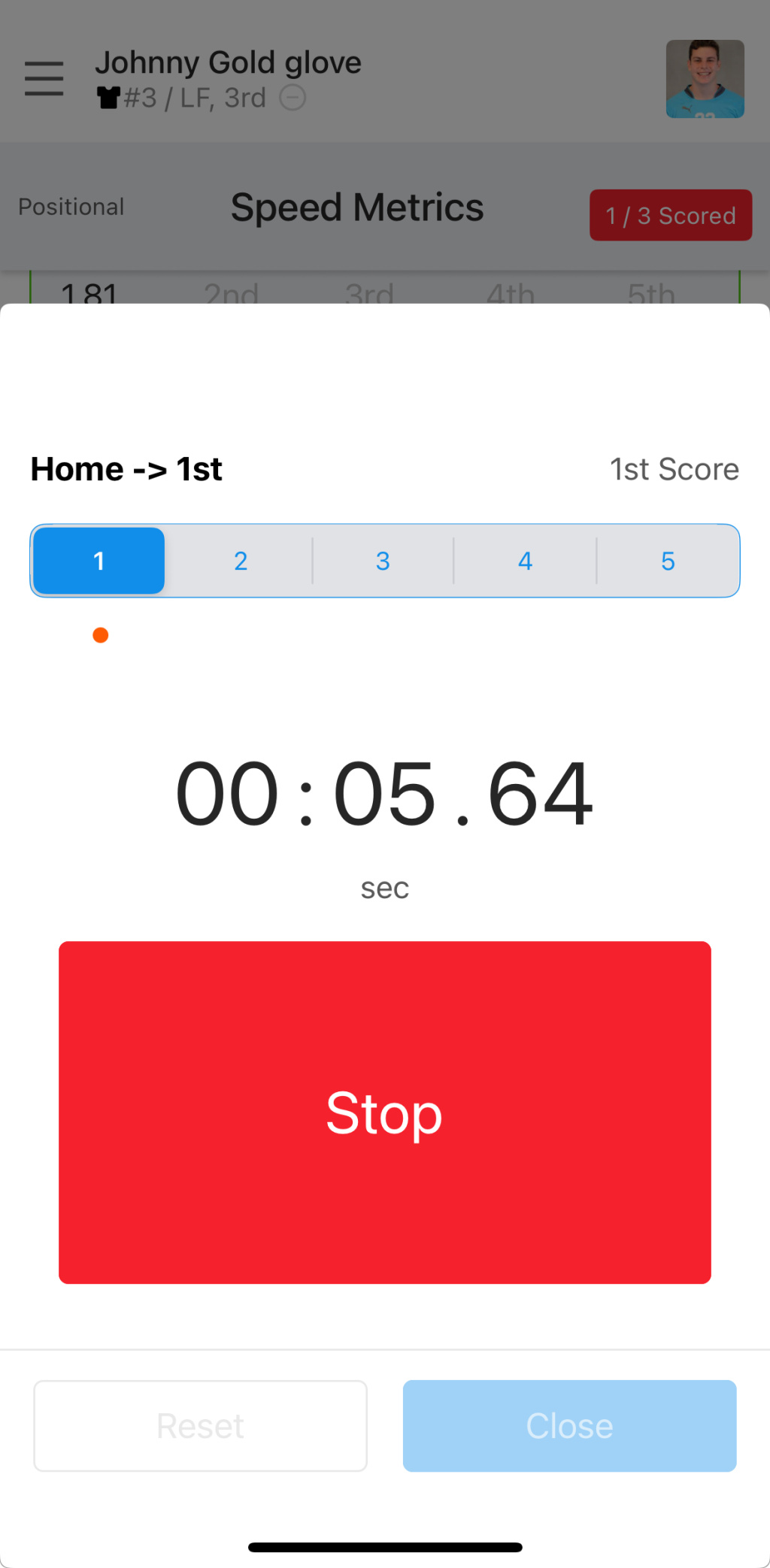
Put away your phone clock app or pocket-sized timer. With SkillShark, measure running speed and store times on one interface.
Open the app and select which player you want to evaluate.
Navigate to the speed metric you want to measure (i.e., Home to 1st or Home to 2nd).
Click on the 'Stop Watch button.
Click the start button when you are ready to record.
Click the stop button when done recording and hit the close button.
*Score will automatically be stored for that player in SkillShark.
3) Mechanics
Mechanics will look different for a pitcher, a hitter, and a fielder. When assigning a mechanics score within SkillShark, here is what to look for across each position in terms of stance and glove work:
Pitching Mechanics
Wind up: The pitcher's pivot foot should be on the pitching rubber, while both their shoulders should be facing the batter slightly.
Arm cocking: The pitcher's arm should be raised to a cocked position where the elbow is higher than the shoulder at a 90-degree angle.
Follow-through: After the ball is released, the pitcher's throwing arm should continue moving across their body in a downward & outward arc.
Hitting Mechanics
Rotation: The hitter's front leg should be strongly planted on the ground to allow for their hips to rotate forward and shoulders to pull back slightly—generating efficient power in the swing.
Alignment: As the hitter is making contact with the ball, the front leg should be firmly planted on the ground, and the hitter's body weight should be shifted to the front foot.
Follow-through: The hitter's weight should be transferred to the front leg, their shoulders and arms should be relaxed, and their head should remain still in the follow-through.
Fielding Mechanics
Ground balls: The fielder's glove should be low enough to the ground so that the tip of the glove is touching the ground.
Fly balls: The glove should be above the fielder's head with their fingers pointing upward. But, fielders should be in the line of sight with the ball.
Line Drives: The glove should be positioned at chest or waist level (wherever the height of the ball is).
For instance, if a fielder meets the proper criteria when catching fly balls, ground balls, and live drives, assign them a score closer to 10.
4) Accuracy
Pitcher
Strike to walkout ratio: Number of strikeouts divided by number of bases on balls (or walks)
Ratio
2.0
Acceptable
3.0
Very good
4.0
Excellent
Hitter
Batting average: Hits divided by number of at-bats
Ratio
Below .250
Acceptable
.250 to .274
Good
.275 to .299
Very good
.300 or above
Excellent
Fielder
Fielding %: Number of putouts + assists divided by total # of chances. *Varies by position.
Ratio
.995 and above
First basemen
.995 and above
Catchers
.990 and above
Outfielders
.980 and above
Infielders (except first basemen)
5) Contact
We break down what to look for within contact when measuring athletes on both hitting and bunting.
Hitting Contact
Launch angle: Pay close attention to the angle at which the ball leaves the bat. The launch angle indicates different types of hits. I.e., Line drives, ground balls, and fly balls.
Adjustments: Are hitters adjusting their body & bat positioning to different types of pitches in order to make good contact?
Soft vs. hard contact: As a simple rule of thumb, the harder the contact, the better the outcome.
Bunting Contact
The bat should meet the ball softly. The bunter wants to achieve a gentler ball contact, hitting the ball a short distance and causing the pitcher or third baseman to field the ball.
Wrapping Up
A comprehensive assessment of a baseball player should measure velocity, speed, mechanics, accuracy, and character. Rather than merely relying on professional training and personal experience, using a baseball evaluation app will provide you with reliable results essential for making important decisions.
Although these are the top five baseball metrics that you utilize SkillShark for, the app has the capability to evaluate players on any baseball metric seamlessly.
We’ve evaluated approximately 1200 players this season. It was super simple and convenient. Data entry usually took us eight hours a day, for fifteen consecutive days. With the volume of athletes that we need to process in one event, SkillShark has probably saved me about 120 hours overall.
Book a Walkthrough
Learn how SkillShark can streamline your baseball evaluations. Let us walk you through the features of the platform and set up your free account.
Cut down evaluation time
Reduce stress
Improve athlete development
Customer Testimonials
Explore how
SkillShark
has transformed careers and organizations through real-life success
stories. Join our community and streamline your athlete evaluations
today.
"We’ve evaluated approximately 1200 players this season. Data entry usually took us eight hours a day, for fifteen consecutive days. With the volume of athletes that we need to process in one event, SkillShark has probably saved me about 120 hours overall."
Jordan Draeger
Owner & Operator — Going Yard Baseball
"SkillShark is an essential tool for all youth sport organizations to take advantage of. As coaches, it is our job to provide both reinforcing and constructive comments to young athletes. SkillShark has helped immensely with our player development and provides a superior solution to our program."
Bill Edwards
Hofstra Head Coach
"SkillShark is a fresh and simple way to do the evaluations that clubs already do, just better. By taking away administrative tasks, more time can be spent developing successful athletes and winning teams. My experience with SkillShark shows it to be a valuable method, and one that is sure to become the status quo."
Chris Shewfelt
Vice President, Toronto FC & Toronto Argonauts
"SkillShark has made tryouts for our baseball club so much easier. It is user friendly and the customer service has been TOP NOTCH!!"
Jill Blake Sutherland
Head Baseball Coach
"The program is very clean, looks professional, and parents & students really enjoy the digital reports. The team at SkillShark is always a phone call away and eager to help set up your program on answer any questions!"
Tyler Stahl
Notre Dame Academy
"Ontario's Canada Games program has athletes all over the province. Providing them feedback about their performance is our biggest challenge. SkillShark software makes it easy for our coaching staff and guest coaches to record data and share it instantly with athletes. It is a great tool for teams and organizations of any size."
Aim to evaluate your baseball players on these metrics 2-3 times per season (at minimum). This can be at tryouts, mid-season evaluations, and year-end evaluations.
SkillShark is a top-rated evaluation app enabling coaches to easily score athletes from their mobile devices and then analyze that player data from auto-generated reports.
For instance, let’s assume you are evaluating a player on their hitting mechanics. At each evaluation throughout the year, you would use SkillShark to enter the player’s scores. At the end of the season, you can leverage SkillShark’s individual development reports to see how that player has progressed (or regressed) on their hitting mechanics.
Danielle Stringer
Danielle is a dynamic content marketer with a unique blend of creativity and analytical expertise. She is driven by her passion for helping companies scale through lead generation, always finding distinctive ways to connect with her audience. Drawing from her extensive background in B2B SaaS, she is thrilled to apply her skills and knowledge in her current role at SkillShark Software Inc.